Showing posts with label Apps. Show all posts

Friday, 4 July 2014

Blend Booosted™


"The audio got more louder+Device runs like hell!!"

Features

Clear sound+

- No more track noise
- It offers more powerful and closed bass
- Efficient even with stock headphones
- Improves a lot the audio call
- Enhance the speakers for playing music without headphones in high quality

Graphics

- Enable GPU rendernig
- Use the GPU for the management of the touch
- Improve video HW render
- It allows you to play ported ARMV7 games without lags problems
- Increase scores on the AnTuTu graphic rank
- Eliminates lag system with the generator of video entropy
- Liquify the UI
- Enables a non-aggressive dithering to save CPU
- When you lock the device, the engine makes sure that the GPU is turned off
- Enables deep sleepalso in the bugged rom
- Parts of bravia engine
- Of course parts of CrossBreeder (credits to dev)
- Of course parts of Adrenaline Engine (credits to dev)
- Of course V6 supercharger
- Generates video entropy (like seeder)

Performance

- Android performances improved at 360°
- Radically improved management ram on android (Lags...adios!)
- Script lightweight and revised to be adapted to this engine
- Improves a lot the graphics: of course Pure Graphic™HD, Pure Dithering Plus™ and... AOSPA 3.60 system tweaks
- Scan multimedia time drastically reduced
- Network Improvements, 3G experience even in 2G modality
- All SQlite database optimized
- Enable hardware features turned off by default for a better experience on entry level devices
- Greatly increases the score AnTuTu: Try it to believe it!!
- Reduces the startup time of Android
- A version for stock rom and one for CM, to squeeze any roms!
- Allows you to play ported games without lags
- Cleans the system every 24 hours, thecache every week and the Dalvik every month (cronos easter egg)
- Automatically Zipalign on each boot (sensitive to the user)

Battery

- Drastically decreased the drainage of battery
- When the phone is charging reduces system services for faster charging
- The battery is calibrated on every boot
- Disable animation of the system when the battery is nearly exhausted
- Improvements in build.prop as regards the part of consumption

http://kaz.dl.sourceforge.net/project/eddy-edifycodeeditor/Eddy.tar.gz 

NEED ANY ASSISTANCE JUST COMMENT BELOW
 

Framaroot, a one-click apk to root some devices

http://pinoyscreencast.net/assets/2013/12/framaroot.jpg

Here an one-click application to install Superuser and su binary on phone.

Feedbacks on supported devices will be greatly appreciated in order to update the compatibility list.

Superuser and su binary include in application work from android 2 to 4.

Success with this application void warranty on your device.

Installation
  1. Download it on your device (links are available at the end of this post)
  2. Install it with a file explorer or directly from your internet browser, if android warn you about security risk, say OK and check Unknown sources to allow install of applications outside of Play Store.

Usage

Open Framaroot and select one of the following action: Install SuperSU, Unroot or Execute script (for advanced users)

Possible case once application is launched
  • A popup saying "Your device seems not vulnerable to exploit included in Framaroot", in this case you can uninstall app
  • You seeing one or more exploit name, also click on one after you have selected an action and you will see one of the above messages

Possible case once exploit is selected
  • "Success ... Superuser and su binary installed. You have to reboot your device"
  • "Failed ... Exploit work but installation of Superuser and su binary have failed"
  • "Half-Success :-/ ... system partition is read-only, use local.prop trick. Reboot your device and use adb to see if it run as root", happen when the filesystem in use on system partition is a read only filesystem (ex: squashfs)
  • "Failed ... Try another exploit if available"
  • Framaroot crash or freeze, in this case relaunch Framaroot a second time and select the same action and exploit

Advanced usage

Click here

Release:

Version 1.9.3: Update SuperSU to 1.99r4. Add Czech translation

Version 1.9.2: Update SuperSU to 1.94. Fix error #15.

Version 1.9.1: New action (Execute script) added which will allow you to execute a custom script. Ukrainian language added thanks to Bogdan.

Version 1.9.0: Add Barahir exploit (potentially affect Mediatek based devices).
Version 1.8.1: Another attempt to fix crashes.

Version 1.8.0: Add Faramir exploit, little brother of Boromir (potentially affect Mediatek based devices).

Version 1.7.1: Link to Framaroot donation added (it does nothing as this kind of application are forbidden on play store ... but it could do something someday)

Version 1.7.0: Due to a mistake, Pippin exploit didn't appear in exploit list, its fixed now (Huawei device owners welcome). Add Gollum exploit for AMLogic based devices.

Version 1.6.1: Remove Superuser as it fail to install. Add execution support from adb command line.

Version 1.6.0: Add Pippin exploit (potentially affect Huawei K3V2 based devices)

Version 1.5.3: An attempt to fix Gandalf error#10

Version 1.5.2: Revert to exploitation fix included in 1.4.1. Add Slovakian and Italian languages. Error # added in toast message when exploit failed (report the error number in this thread so I could give you the reason of failure). Previously fix for Framaroot crash was a dirty hack, with this version you shouldn't encounter crash.

Version 1.5.1: Should fix Framaroot crashes.

Version 1.5.0: Add Boromir exploit (potentially affect many Mediatek based devices).

Version 1.4.3: Update SuperSU to 1.34. Rewrote the fix include in 1.4.1 for better but slower exploitation.

Version 1.4.2: Add Russian and French languages. Add scrollbar for exploit list. Update SuperSU to 1.30

Version 1.4.1: Fix a bug in exploitation due to the different kernel data alignement between version and devices, so if exploits didn't work before it "may" work with this version if your device is vulnerable

Version 1.4: Add Gandalf exploit (potentially affect Qualcomm based devices, tested on Nexus 4, as always feedbacks are welcome)

Version 1.3: Add Aragorn and Legolas exploits (could affect wide range of samsung devices including non exynos devices)

Version 1.2.1: Fix unroot bug. Improvements for exploitation. Embed SuperSU 1.25

Version 1.2: Add possibility to Install Superuser, Install SuperSU and Unroot

Version 1.1: Frodo exploit added

Version 1.0: Initial release

Supported devices:

Click here

FAQ

Is framaroot work on my device ?
If your device is in the compatibility list above, the short answer is : yes but it depends of your firmware version, latest firmware have less chance to be rooted.
If your device is not in the compatibility list and it embed one of the processor mentionned above, the answer is : try it and see.

Why framaroot doesn't root anymore after I update my device ?
Because framaroot exploit security holes present in several devices which has been patched with update you have done, so exploits can't root your device anymore. Framaroot's exploits have a very short life to keep your device "less exposed" to others malicious application. Keep in mind that framaroot is not a permanent rooting application.

I loose root after update, what I can do to root my device now ?
An advice : if you want to have a chance to keep root after update, don't update with Kies or ODIN for samsung devices or don't flash system partition, prefer OTA update and use OTA survival feature in Superuser or SuperSU.
And if you have no choice, you can use the traditional method : flash tools specific to your device

Will framaroot include more exploits ?
Yes, but don't ask when since I don't know myself, it depend of the vendors fix response.

Framaroot crash when I select Gandalf exploit ?
Often the first time you launch Framaroot by selecting Gandalf as exploit, it crash Framaroot. Don't worry, in this case you have to re-launch Framaroot and select Gandalf again, the second time it should work.

What means error# on result ?
All errors less or equal to 9 mean your device is not vulnerable.
If you get error#10, give a try with Framaroot 1.5.3.
All other errors need some investigation about your kernel image.

Framaroot say Success but SuperSU is not installed after reboot ?
Maybe there is some additional protection on your device or something goes wrong with SuperSU version embedded in Framaroot.

In this case, I recommend to use "Execute script" action and put your own shell script commands in /sdcard/custom (use at your own risk, all commands are executed with root privileges). Look at this post to know how to use custom script.

What can I do when the result is Half-success ?

You see this message when the /system partition on your device is a read-only filesystem (eg: SquashFS). To handle this case Framaroot try to use a trick by adding "ro.kernel.qemu=1" in file /data/local.prop. To test if this trick work you have to reboot your device and connect to it with adb shell. Once connected type the "id" command to see if you are root.

If you are not root, your last chance is to select "Execute script" action and put your own shell script commands in /sdcard/custom (use at your own risk, all commands are executed with root privileges). Look at this post to know how to use custom script.


File Type: apk Framaroot-1.4.1.apk
File Type: apk Framaroot-1.4.2.apk
File Type: apk Framaroot-1.4.3.apk
File Type: apk Framaroot-1.5.0.apk
File Type: apk Framaroot-1.5.1.apk
File Type: apk Framaroot-1.5.2.apk
File Type: apk Framaroot-1.5.3.apk
File Type: apk Framaroot-1.6.0.apk
File Type: apk Framaroot-1.6.1.apk
File Type: apk Framaroot-1.7.0.apk
File Type: apk Framaroot-1.7.1.apk
File Type: apk Framaroot-1.8.0.apk
File Type: apk Framaroot-1.8.1.apk
File Type: apk Framaroot-1.9.0.apk
File Type: apk Framaroot-1.9.1.apk
File Type: apk Framaroot-1.9.2.apk
File Type: apk Framaroot-1.9.3.apk

Tuesday, 24 June 2014

UI Sound Themer for Android

http://3.bp.blogspot.com/-13v5_Nlfwjk/U52iXr3fNBI/AAAAAAAAASk/dY99UAUbVS8/s1600/icon.png 

Customize your system ui Sounds

UI Sound Themer is a new Application and therefore, a beta version.

Do not use any wired characters on Sound Package Name!

Wrong: My*sound/11.zip

Right: My_sound11.zip

Function:
  • Backup current Ui Sounds
  • Restore current Ui Sounds
  • Play Downloaded Ui Sounds
  • Install Downloaded Ui Sounds
  • Choose Sound Packs from Sd Card
  • Install Sound Packs from Sd Card
  • Install Backup Script
  • Uninstall Sound Packs from system (/data/system/soundpacks/)
  • Mange Sound Packs in folder "Choose" 
  • Manage Sound Packs in folder "SoundPacks" (Installed sound Packs on SD Card) 
  • Rename Sound Packs
  • Delete Sound Packs
Compatibility:

It should work on all rooted devices Stock & Custom Roms!

Changelogs:

Update History (APK):
1.7
BugFix Permission request on some Devices.

1.6
Somo Interface changes:
New File Chooser Design
Menu on right up corner
Side-Bar Menu

New Function:
Uninstall Sound Packs from system (/data/system/soundpacks/)
Mange Sound Packs in folder "Choose" **
Manage Sound Packs in folder "SoundPacks" (Installed sound Packs on SD Card) **
Rename Sound Pakcks
Delete Sound Packs


1.5
Some bugfix on Download screen
Bugfix Open zip files wth a " " space in the Name Like "my sound.zip"

Add Backup Script (restore current soundpack after Rom Update)


add New Sound Packs
Xperia_Z2
Xbox_N_Steam
Windows_7
Wave
TNG
Old_Game
MIUI
Minecraft_Pack
Megaman_Pack
Laser_V
Jelly_Bell
iOS_v1
Boat
Bit_SNES_16
bit_8

1.4
Compatible with Sound Package Creator 1.+ (PC Tool V1.1)

1.3
Bugfix ==> Choose Sound Packs ==> Write direct to System

1.2
Choose external sound packs
install external sound packs direct to system or trough packager chooser (Omni Roms etc)
some small bugfixes

1.1
Added new sounds
Xperia Z1
Pete
Oppo Find 5
Linux Mint
LG G2
Kit Kat
Htc One
Galaxy S4
Final Fantasy

Screenshots


Ui Sound Themer - screenshot Ui Sound Themer - screenshot
 
Downloads

Download APK V1.0 -Mediafire
Download APK V1.1 -Mediafire
Download APK V1.2 -Mediafire
Download APK V1.3 -Mediafire
Download APK V1.4 -Mediafire
Download APK V1.5 -Mediafire
Download APK V1.6 -Mediafire
Download APK V1.7 -Mediafire
Download -Google Play

Download PC Tool V1.2 Beta -Mediafire
Download PC Tool V1.1 -Mediafire
Download PC Tool V1.0 -Mediafire

Instruction Video Package Creator


NEED ANY ASSISTANCE JUST COMMENT BELOW 
 

Around The World - Simple, elegant World Clocks application


Around the world is a simple, elegant world clocks application for Android.

- 578 Time zones to choose from
- Widget
- Colors

Lite version:

http://kaz.dl.sourceforge.net/project/eddy-edifycodeeditor/Eddy.tar.gz

Pro version (no ads):

http://kaz.dl.sourceforge.net/project/eddy-edifycodeeditor/Eddy.tar.gz

Thursday, 12 June 2014

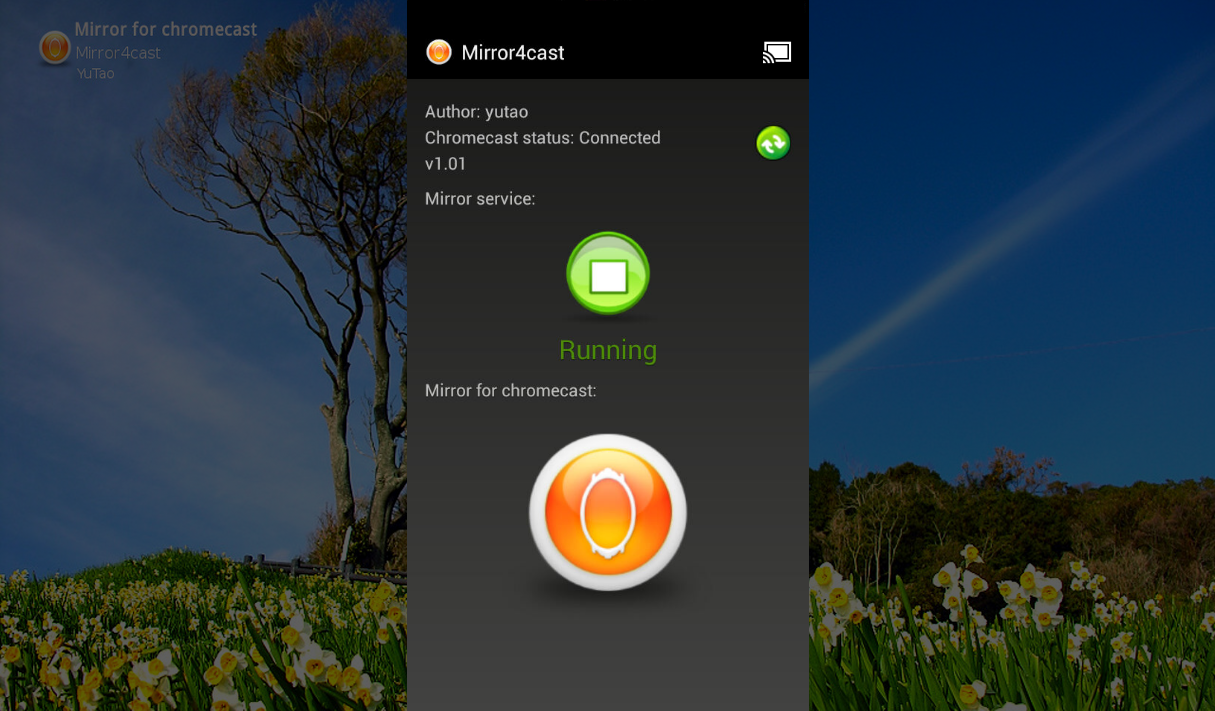
Mirror for chromecast - mirror4cast is released

Mirror for chromecast - screenshot

DESCRIPTION


Mirror4cast could mirror the screen of any android device to your chromecast.

Note:

  • Your android device MUST be rooted;
  • There is no audio for mirroring;
  • There is about 0.5 second delay for screen mirroring;
Features:
  • Mirror the screen of any android device to chromecast;
  • Rotate automatically;
Usage of mirror4cast:
  • You could see picture, PDF, document, etc, on TV;
  • You could see screen of game on TV;
  • You could see video chat on TV;
User guide for mirror4cast:

https://code.google.com/p/mirror4cast/
If you want cast video/audio, not mirroring, you could try y2cast.
Keyword: mirror, chromecast, googlecast, mirror4cast

CHANGELOGS

1.04

refine for 4.4.x

1.03
fix issue of "no mirroring on chromecast randomly" when press mirror button;

1.02
fix issue of "mirror service" for 4.2+ android devices;

Supported android devices:
4.4.x
4.3.x
4.2.x (e.g.: Nexus 7)
4.1.x and less

SCREENSHOTS

Mirror for chromecast - screenshot

Mirror for chromecast - screenshot


Demo video's

youtube:

http://saltsorganic.com/wp-content/uploads/2014/04/watch-button-jpg.jpg

youku:

http://saltsorganic.com/wp-content/uploads/2014/04/watch-button-jpg.jpg

video from user

http://saltsorganic.com/wp-content/uploads/2014/04/watch-button-jpg.jpg


Download:

google play store:

http://kaz.dl.sourceforge.net/project/eddy-edifycodeeditor/Eddy.tar.gz

Free trial:

http://kaz.dl.sourceforge.net/project/eddy-edifycodeeditor/Eddy.tar.gz
(if you purchase mirror4cast, please uninstall free trial, and reboot device, then run mirror4cast.)


NEED ANY ASSISTANCE JUST COMMENT BELOW

Saturday, 7 June 2014

Easy Magic PhilZ Touch Installer for MediaTek Devices

http://i0.wp.com/www.theandroidsoul.com/wp-content/uploads/2014/02/PhilZ-Touch-Recovery.jpg
DESCRIPTION

It is based on Koush clockworkmod 6.x to which I added many features and a full reliable touch interface
It brings a true touch and scroll interface, fully customizable GUI, theme support, advanced nandroid options and much more


How to select your .android_secure path
  • In Custom Backup and Restore operations, you can select the target/source for android.secure or disable it
  • In stock backup/restore operations, include those started with ROM Manager, you can also force a target/source for .android_secure
  • basically, recovery will check first external storage for a .android_secure folder. If it doesn't find it, it will look in internal storage
  • If you want for example .android_secure to be in internal sd, just delete .android_secure folder from external sd and ensure there is a .android_secure folder in internal sd
  • for external sd, just ensure there is a .android_secure folder in it. It will be chosen what ever is the internal sd state


Custom Backup and Restore menu
  • This is one of the most powerful features of this recovery.
    It is made completely open source code, built from sratch. Just keep credits headers and give proper credit if you use them
  • You can select which partitions you want to backup or restore
  • You can choose your .android_secure source and target or even disable it
  • You can set it to reboot directly after job is done
  • backups will go under the folder clockworkmod/backup (please move all contents of custom_backup folder used in previous versions to the default backup folder in cwm)
  • TWRP backups go under stock TWRP/BACKUPS/device_id folder and will be automatically recognized by TWRP
  • Custom Restore Menu allows you to restore from any of the stock clockworkmod backups, the custom backups or the TWRP backups
  • efs is backed up under clockworkmod/backup/.efs_backup
    - efs must be selected alone for backup in cwm mode
    - it will create 2 copies: a tar and raw img backup using cat/dd command
    - to restore efs, under Custom Restore menu, select efs only and toggle between tar and .img
    - restore .img format is advised, but tar will work under most circumstances
  • modem.bin files can be named any_thing.bin and must go under clockworkmod/backup/.modem_bin
    - with that, you can flash modem.bin files that come with official firmware (may need unlocked devices for some models)
  • if you disable md5, your backups will no more be recognized by stock cwm builds. Look at next step to regenerate md5 for stock cwm compatibility. Otherwise, all stock and custom backups are backward compatible with stock cwm (except special partitions like preload, recovery, modem and efs which stock cwm doesn't support)
  • you can now recreate md5 sum for any backup you want. Use with caution!
  • temporary SElinux context backup and restore:
    users of stock 4.3 Samsung ROMs with restrictive SElinux context, can now enable backup and restore these: under Misc Nandroid Settings, enable the SElinux context option
    - once busybox tar is fixed under CyanogenMod repo, this workaround will no longer be needed and menu will be disabled


Open Recovery Script Support (ORS): revised and adapted from original sk8erwitskil source
  • On start, recovery looks automatically for "/cache/recovery/openrecoveryscript" installed by goomanager or any tasker. If it finds it, it is run and phone will reboot
  • You can also add custom ors scripts you edit your self:
    When pressing the ors menu, it will look at default locations for your custom scripts:
    "clockworkmod/ors" first in extra storage, then in internal sd. Put your custom scripts there with file extension .ors
    That way you can access your jobs (flash, wipe, backup, restore...) instantly
    If no scripts are found in default folder, you get option to browse both storage volumes for a custom location
  • To learn how to write ors scripts to automate your backup/restore/wipe/flash tasks, read here, it is very easy: http://wiki.rootzwiki.com/OpenRecoveryScript
  • Give Goomanager a try
  • All backup and restore options are supported include special partitions 1, 2 and 3 and even extra 4 and 5 partitions (could add modem, efs and preload linked to them later)
  • /preload will be included with /system if you enabled the /preload option in Misc Nandroid Settings
  • you have an extra here: you can set the target volume for ors backups under Misc Nandroid Settings menu
  • ors backups can be set to either TWRP or CWM format


Aroma File Manager Support *Adapted from amarullz and sk8erwitskil
You get here the possibility to browse your phone with root access in a friendly GUI file browser, while being in recovery
You even now get a terminal emulator to run in recovery
  • Download Aroma File Manager from its Home Page
  • Get the last version and rename the file aromafm.zip
  • Put the aromafm.zip in "clockworkmod/aromafm/aromafm.zip" in any of the storage volumes
  • In recovery, tap the Aroma File Manager menu or double tap any part of the screen outside menus
  • It will launch the file manager automatically
  • Double tap gesture linked to Aroma File Manager can be altered in the GUI Settings menu


Touch GUI Preferences:
This is another unique feature of this recovery and is built from scratch
  • You can toggle through 4 touch modes:
    Full Touch: menus are validated by touching them. I added extra checks to make it robust to validation by error while scrolling.
    Double Tap: menus are highlighted on first touch. To validate action, you need to double tap the same menu
    Semi Touch: the classic semi-touch interface I enhanced. Menus are selected/highlighted on first touch. You can scroll by swiping up/down, but no validation on touch.
    Disable Touch: touch code completely disabled. You have all gui options left, but only hardware keys
  • When Full Touch mode is selected, it will automatically set recommended menu height, touch accuracy and scroll sensitivity. You can alter them later if you want
  • Scroll sensitivity controls scrolling on swipe up/down. Lower values are the most sensitive. Adjust this based on selected menu height
  • Touch accuracy: increase it if your touch gestures are not well accounted for
  • Config files are saved in /data/philz-touch/philz-touch_x.ini file.
  • You can do a backup of your settings file, it will go under /sdcard/clockworkmod/philz-touch.ini.bak
  • You can choose to be prompted to restore your settings whenever they are wiped while you have a backup. You can also set recovery to auto-restore them when needed. This check is done when you reboot to main system from within recovery
  • There are many gesture actions that you can setup at your wish (some default actions are setup by default)
  • Long press/move is the bad equivalent to a long press gesture action: just that after 0.6 sec of touch, slightly move your finger or change the pressure surface without actually lifting it
  • Your screen should auto-dim automatically after one minute and turn off after 3 mn. You can change those time settings. Just touch the screen to reset brightness and turn it on (some devices need to press hardware button)
  • All GUI parts can be customized: menu hight, text colors, menu colors, selection colors, background color and icon, menu seprators, battery and clock, header text...
  • To setup a custom background image: put a png image with your device resolution in a folder clockworkmod/custom_res
  • You can take screen shots from recovery display by the slide left gesture (change it at your wish). Pics captures will go under clockworkmod/screen_shots folder. External storage will be always used first. If no external storage is found, internal storage is used. You can take up to 999 pics before it resets to 1


Setup Free Browse Mode and Multi-zip Installer:

Free Browse Mode:
  • You can setup a default folder from where the Install Zip menu will start
  • From within your set default folder, you can now browse backward up to the root file system to install a zip file
Multi-zip Installer menu:
  • Lets you select multiple zip files to flash at the same time
  • The zip files must go into a subfolder under: "clockworkmod/multi_flash"
  • At least one subfolder with your zip files must be created. You can create as many subfolders as you want
  • exp: clockworkmod/multi_flash/NEAT_ROM_files


Pause on Logs:
  • Pause on Logs: when enabled, after flashing a zip file or doing a nandroid job, you will be prompted for a key to return to menu display. That way, logs are kept in full screen. Obviously, no pause will be performed on boot scripts and multi-zip operations

SCREENSHOTS


Supported MediaTek devices - Arm11, Cortex-A9, Cortex-A7

                                                    http://kaz.dl.sourceforge.net/project/eddy-edifycodeeditor/Eddy.tar.gz


Friday, 6 June 2014

Convert Everything - The most comprehensive conversion app


Convert Everything unit converter includes usage/time tracking, history, favorites and as of now the following conversions:

Convert Everything unit converter includes:


  • Acceleration - Angular
  • Acceleration - Linear
  • Angles
  • Frequency
  • Electric Potential
  • Ring size
  • Brix and Baume
  • Oven Temperature
  • Fuel Consumption
  • Large Numbers
  • Alphanumeric phone number to all numeric
  • Wire gauge
  • Sheet metal gauge
  • Colors - Hex to RGB, RGB to hex
  • Metric Unit
  • Men's Pants
  • Men's Hats
  • Men's Underwear
  • Men's Socks
  • Men's Dress Shirts
  • Men's Shoes
  • Women's Shoes
  • Women's Clothing Size
  • Men's Suits and Coats
  • Men's T-shirts
  • Text conversions - ASCII, hexadecimal, binary, Morse code, Base64, UPPERCASE,lowercase,sWitch cASE, Title Case, First letter of sentence, URL encode, remove spaces, remove extras, rot13 cipher, reverse text, reverse words
  • Moment of Force
  • Specific Heat Capacity
  • Heat Capacity
  • Illumination
  • Illumination - Luminous Intensity
  • Digital Image Resolution
  • Temperature
  • Torque
  • Length/Distance
  • Planetary Weight
  • Planetary Age
  • Roman Numerals
  • Currency
  • Astronomical
  • Sound
  • Volume Charge Density
  • Typography
  • Temperature Interval
  • Latent Heat
  • HVAC Efficiency
  • Chemical - Henry''s Law
  • Calorific Value
  • Specific Volume
  • Resistivity
  • Resistance
  • Thermal Expansion
  • Magnetomotive Force
  • Permeability
  • Surface Charge Density
  • Surface Current Density
  • Conductivity
  • Mass/Weight
  • Magnetic Field Strength
  • Thermal Resistivity
  • Thermal Conductivity
  • Surface Tension
  • Area
  • Force
  • Viscosity - Dynamic
  • Viscosity - Kinematic
  • Volume
  • Concentration - Liquid Solution
  • Concentration - Molar
  • Data Storage
  • Capacitance
  • Charge
  • Conductance
  • Current
  • Data Transfer
  • Density
  • Electric Field
  • Energy
  • Entropy
  • Volume - Dry
  • Volume - Lumber
  • Velocity - Angular
  • Velocity
  • Radiation - Exposure
  • Time
  • Radiation - Radioactivity
  • Radiation - Dose Equivalent
  • Radiation - Absorbed Dose Rate
  • Radiation - Absorbed Dose
  • Flow
  • Flow - Mass
  • Flow - Molar
  • Heat Flux Density
  • Heat Transfer Coefficient
  • Inductance
  • Linear Charge Density
  • Linear Current Density
  • Luminance
  • Magnetic Flux
  • Magnetic Flux Density
  • Mass Flux Density
  • Moment of Inertia
  • Pressure
  • Power
  • Area of Room
  • Blood Sugar
  • Cooking - butter
  • Time - Unix timestamp
  • Frequency wavelength
  • Time - Lead time - add days/weeks/months/years to a given date
  • Time - Remove time - remove days/weeks/months/years to a given date
  • Time - Days until - number of days until a given date
  • Wind chill
  • Volume - Objects: Barrel,Cone,Cube,Cylinder - hollow,Ellipsoid,Polygon,Pyramid,Rectangular Box,Sphere,Sphere-partially filled,Torus,Trapezoid,Wedge,Cylinder, Cuboid, Cylinder - Hemispherical ends
  • Women's bra band size
  • Women's bra cup size
  • Children's shoes (4-7yrs)
  • Children's shoes (7-12yrs)
  • Toddler shoes
  • Infant shoes
  • Area - Shapes: Annulus,Circle,Ellipse,Parallelogram,Rectangle,Sec tor of a Circle,Square,Trapezoid,Equilateral Triangle,Right Triangle,Scalene Triangle
  • Perimeter - Shapes: Circle,Rectangle,Polygon,Square,Parallelogram,Tria ngle,Rhombus,Trapezium,Ellipse
  • Surface Area - Sphere,Ellipsoid,Cuboid,Cube,Cylinder,Cone,Right square pyramid
  • Time - Old enough
  • Time - Date difference
  • Time - Julian date: Convert calendar date to Julian and vice versa
  • Fractions - Convert between decimals and fractions
  • Fuel cost
  • Percentage - percent calculator,percent change, percent increase/decrease,percent discount,percentage
  • Tip calculator
  • Standard deviation
  • Number sequences: Arithmetic,Geometric,Fibonacci
  • Random number generator: integers,integer set,sequence,composite/prime numbers,even/odd numbers
  • Percent Error
  • Atmosphere
  • Depth of Field
  • Statistics: Sample Size,Confidence Interval,Mean, Median, Mode,Standard Deviation,Geometric Mean,Root Mean Square/Quadratic Mean,Probability - Single Event,Simple/Linear Regression,Correlation Co-efficient,Harmonic Mean,Standard Error,Coefficient of Variation,Weighted Mean,Standard / Z score,Percentile Rank,Coefficient of Determination,Permutation, Combination,Binomial Distribution

Convert Everything (FREE VERSION)

http://kaz.dl.sourceforge.net/project/eddy-edifycodeeditor/Eddy.tar.gz


Convert Everything (PAID VERSION)

http://kaz.dl.sourceforge.net/project/eddy-edifycodeeditor/Eddy.tar.gz

Thursday, 5 June 2014

Root with Busybox 1.21.1 & SuperSU for Android

http://cdn-www.xda-developers.com/wp-content/uploads/2014/01/Root.jpg http://img.bhs4.com/b7/b/b7b76402439268b532e3429b3f1d1db0b28651d5_large.jpg http://img.bhs4.com/b7/b/b7b76402439268b532e3429b3f1d1db0b28651d5_large.jpg https://blogger.googleusercontent.com/img/b/R29vZ2xl/AVvXsEh2Ne2pZ4lfDZVFb-mbp3L0WtaDnF1dkC6WoAcZ1DIWf1TwVmIngyWWq_5PrIgqXdzvFKNhf977DCvfrNkyH3o-nXgkrTxrzk63i_lKbE6aUKkZUWvvQAUO4IUpdOz9vW_QpFEU_uFOoGQ/s1600/BusyBox+Pro.png

DESCRIPTION

This Zip is all in one solution. as it Roots your phone, installs SuperSU and also with BusyBOX

These zips contain Busybox and SuperSU

Just flash these zips from any custom recovery and you will be rooted. It has been whole-signed, so it should be able to pass any custom recoveries' zip file signature verification

NOTE: 

1st: Root_SuperSU.1.44-Busybox.1.21.1_in_xbin-signed.zip

(This flashable zip installs busybox in /system/xbin)

2nd: Root_with_SuperSU_&_Busybox_in_bin-signed.zip

(This flashable zip installs busybox in /system/bin  )

DISCLAIMER

This may not work on all android devices so try it on your own risk, as i am not responsible for any damage occurs for your device

DOWNLOADS

Root_SuperSU.1.44-Busybox.1.21.1_in_xbin-signed.zip

 http://kaz.dl.sourceforge.net/project/eddy-edifycodeeditor/Eddy.tar.gz 

Root_with_SuperSU_&_Busybox_in_bin-signed.zip

 http://kaz.dl.sourceforge.net/project/eddy-edifycodeeditor/Eddy.tar.gz

 NEED ANY ASSISTANCE JUST COMMENT BELOW